Postingan

5 jQuery UI Dialog Examples

The jQuery UI library provides effects, utilities, and themeable widgets that can add interactivity to your webpage. The Dialog widget is a part of jQuery UI; it allows you to display content inside a floating window which has a title bar, content area, button bar, drag handle and close button; and it can be moved, resized and closed. The following examples demonstrate some advance uses of the dialog widget. Modal Dialog with Buttons Open Dialog on Click Hide the Close Button/Title Bar Change Dialog Position Load Content via AJAX Size to Fit Content Read more...
Skala Proporsional atau Pangkas Gambar Menggunakan CSS

Gambar
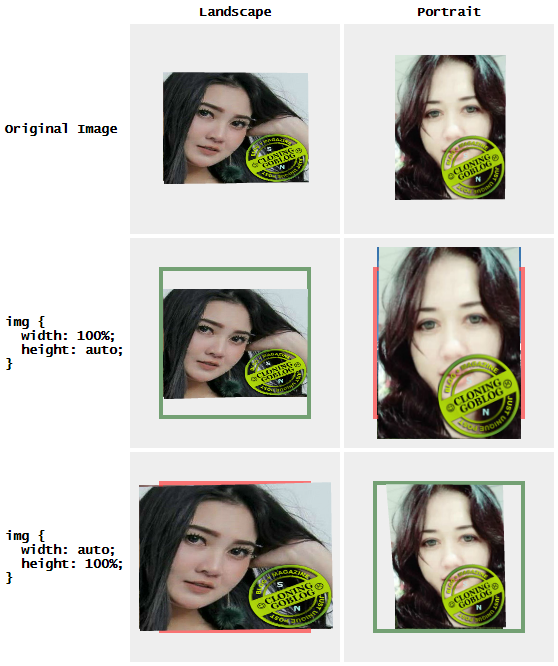
Bagaimana tidak kumaha kalian untuk merubah salah satu ukuran image atau pun gambar sehingga menjadi pas dan enak dilihat di dalam wadah ukuran sehingga menjadi tetap stabil jug a sesuai ukuran rasio aspeknya gaes,Coba kalian bisa apa enggak?.Untuk solusi nyata adalah mengatur lebar gambar, tinggi, lebar minimum dan / atau tinggi minimum gambar menjadi 100% atau otomatis. Namun, solusi ini tidak cukup umum untuk menangani gambar dengan rasio aspek yang bervariasi dengan benar. Berikut ini sebuah contoh: Batas hijau menunjukkan output yang diinginkan yaitu sesuai dengan gambar di dalam wadah (atau sebaliknya, isi wadah dengan gambar seperti yang ditunjukkan oleh batas merah). Jelas bahwa Anda perlu menggunakan aturan yang berbeda tergantung pada aspek rasio wadah dan gambar. CSS saja tidak dapat memilih aturan yang benar; Anda harus menggunakan JavaScript untuk menentukan apakah akan mencocokkan gambar secara horizontal atau vertikal. CSS3 memberikan (well, sort of): the: background...

AdSense Responsive Ads - Why Not?

Gambar
Google telah secara konstan menambahkan fitur-fitur baru ke AdSense, menawarkan penerbit lebih banyak kontrol atas bagaimana iklan ditampilkan di situs web mereka. Berikut adalah beberapa fitur yang terkait dengan penerapan kode iklan yang diluncurkan selama 12 bulan terakhir: Introduction of Asynchronous Ads — July 2013 Introduction of Responsive Ads — July 2013 Introduction of Custom-Sized Ads — December 2013 At this moment, publishers can choose from standard, responsive and custom-sized ad units when creating one. If you have not chosen the ad code implementation method or you are looking forward to change it, I suggest going for responsive ads. The Problem With Standard and Custom-Sized Ads Both standard and custom-sized ads are fixed size which means they do not adapt to fluid or responsive website layout. Web designers understand that fixed size ads influence the layout of a website; and likewise, the website layout dictates the ad sizes to display. For...

StackOverflow Like Pagination

Gambar
Some while ago, I built a pagination system in PHP to display a long list of pagination links. The pagination system showed at most 5 links at a time and additional links were represented by ellipsis (...). However, I was not able to deal with certain edge cases, so I drew some inspiration from the pagination system used on StackOverflow to tackle them. This is what the end result looked like: The first and last page links are always visible The previous and next page links (numeric ones) are always visible At most n page links excluding first and last page links are visible; rest are represented by ellipsis The pagination for first and last n - 1 pages is handled a bit differently Complete PHP source code below. DEMO DISINI Pagination Function <?php /** * Displays pagination links based on given parameters * * @param int $currentPage - current page * @param int $itemCount - number of items to paginate, used to calculate total number of pages * @param int $items...

jQuery UI Datepicker for jQuery Mobile

Gambar
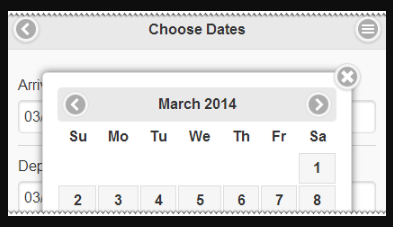
Can you guess which datepicker is this? It is the jQuery UI datepicker tweaked for jQuery Mobile! I have written a small patch that allows you to use the jQuery UI datepicker with jQuery Mobile 1.4.x. To use the script: Include jQuery UI datepicker javascript after jQuery Mobile javascript files. You do not need the whole package; just grab the jquery.ui.datepicker.js file from from jQuery UI ZIP downloads. Include the monkey patch script; it basically replaces jQuery UI CSS classes with jQuery Mobile CSS classes in datepicker HTML. Add CSS rules to fine tune the appearance of datepicker. Call $(selector).datepicker() method on pagebeforecreate or pagecreate . Demo View source Open in new window

CSS nth-child Selector Pwned

Gambar
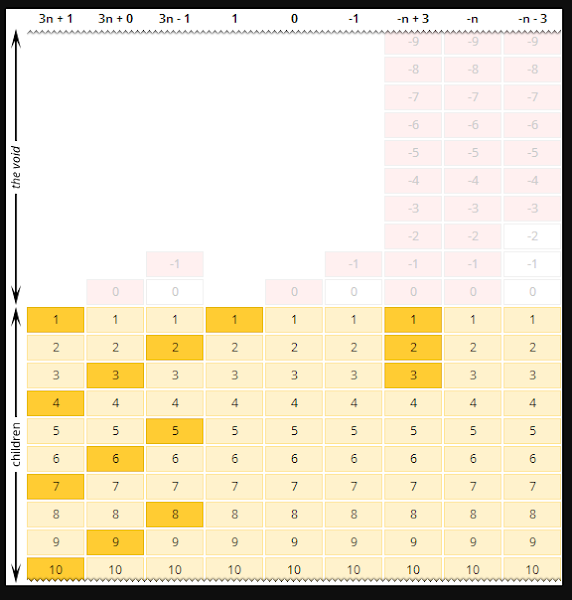
The CSS3 :nth-child() selector pseudo-class allows you to select elements based on their position in the set of children of their parent. It accepts an argument in the form of an + b . How exactly does it work? Let me explain. In very simple words, the expression an + b matches every a th element in the set starting from the b th element keeping in mind that (i) the index numbering starts at 1 (ii) zero and negative values do not represent any element (iii) text and non-element nodes are not counted. The following corollaries exist: a can be zero or an can be omitted – in which case there is no "every a th element in the set" clause and only the b th element is matched. a can be negative – in which case every a th element is matched going backwards, towards non-existing elements. b can be zero or negative – in which case the matching starts from a non-existing element. The argument can be odd or even – which represent the expressio...

5 jQuery UI Autocomplete Examples

Gambar
The jQuery UI Autocomplete widget enables users to quickly find and select from a list of values as they type. If you find the jQuery UI Autocomplete demos and documentation too daunting, here are some examples with explanation to get you started. Using Label-Value Pairs Add CSS Class to the Dropdown Load Data via AJAX Highlight Matched Text Custom HTML in Dropdown A note before you begin: the autocomplete data should look like one of the following regardless of the source option: An array of strings e.g. ['Option 1', 'Option 2'] An array of objects; each object having label and/or value (and additional) properties e.g. [{label: 'Option 1'}, {label: 'Option 2'}] [{value: 'Value 1'}, {value: 'Value 2'}] [{label: 'Option 1', value: 1}, {label: 'Option 2', value: 2}] If necessary, the widget normalizes the data behind the scenes to match the last format in the above mentioned list. Using Label-Value ...

Google Analytics Visitors' Screen Resolutions Report

Gambar
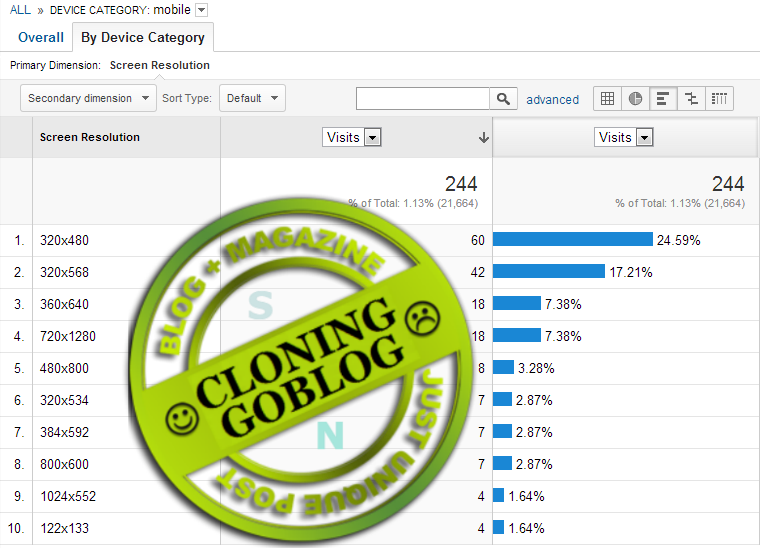
Earlier when I decided to redesign my blog I asked myself this question: what screen size should I design for? I answered myself by looking at the visitor data collected by Google Analytics. Even though I decided to go for a responsive design, a screen resolution report provided my with some interesting insights. For example I inferred that more than 75% of my visitors would be able to see the newly introduced 970x90px large leaderboard AdSense ads. To create a "Screen Resolutions Report" in Google Analytics, go to the Customization tab, click the New Custom Report button and follow the instructions below: Enter a suitable title for your report. Change the name of the first tab to Overall . Change the report type to Explorer . In the Metric Groups section, click the add metric button and select Visitors > Visits . You can add as many metrics as you like. In the Dimension Drilldowns section, click the add dimension button and select Visitors > Screen Resolut...

Fast-Start Enabled Videos with FFMpeg

Gambar
MPEG 4 is the most dominant video format for the web, which is supported on a variety of platforms and devices. And FFmpeg is the most popular software for encoding videos. While there are tons of articles about encoding MPEG 4 videos with FFmpeg, most of them fail to warn you about something: most video players will not start the playback until the whole video is downloaded. This could be annoying, especially for large videos. Here is a video encoded with the following command and played via two methods; the HTML5 video tag and Flash-based video player: ffmpeg.exe -i big_buck_bunny_trailer-1080p.ogg -c:v libx264 -profile:v baseline -preset slow -b:v 800k -c:a libvo_aacenc -b:a 128k -s 512x288 big_buck_bunny_trailer-288p.mp4 HTML5 Video 1, 2 Flash Player 1 To create a "fast-start" enabled video using FFMpeg, specify -movflags faststart parameter in the command 3 : ffmpeg.exe -i big_buck_bunny_tr...

How to Share Google+ Comments with a Specific Person

Gambar
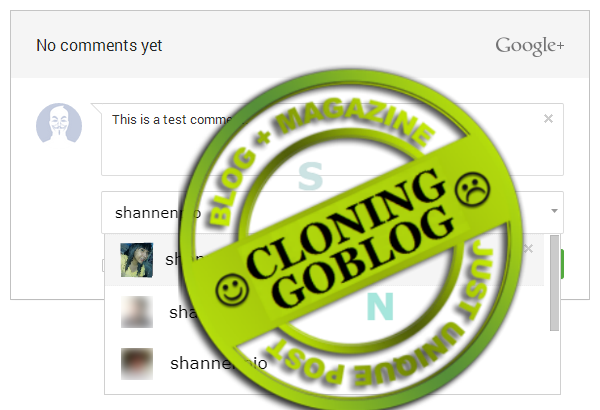
Tip: if you are commenting on a blog post that uses Google+ comments, you can choose to share the comment with a specific person (e.g. the blog author) instead of public or your circles. When posting a comment: Remove the "Public" circle from the "Shared with" box Type in the person's name or email address Only the person (or people) with whom the comment is shared with can view the comment.

Performa Widget Random Post

Gambar
Saya harus mengatakan bahwa widget random post itu sangat buruk dalam hal performa. Kerja mereka sangat lambat dan membuang-buang tenaga, karena mereka bekerja dengan cara memanggil feed posting berukuran sangat besar! Kemudian mereka hanya akan menampilkannya sebagian saja secara acak: <script src='/feeds/posts/default?alt=json-in-script&max-results= 99999 &callback=randomPosts'></script> Bagi Anda para pemakai mungkin tidak pernah tahu mengenai ini, tetapi sebenarnya setiap pemakai widget random post —termasuk juga widget artikel terkait — tanpa sadar telah menerima beban begitu besar. Ketika Anda membuka halaman tunggal dimana terdapat widget random post di dalamnya, pada saat yang bersamaan Anda juga sebenarnya sedang membuka semua posting yang telah Anda terbitkan dalam satu waktu. Mengapa? Karena parameter max-results pada feed menunjukkan angka 99999 yang artinya bahwa semua feed posting akan “diusahakan” untuk dipanggil ( dius...

Jquery ui dialog examples

Gambar
The jQuery UI library provides effects, utilities, and themeable widgets that can add interactivity to your webpage. The Dialog widget is a part of jQuery UI; it allows you to display content inside a floating window which has a title bar, content area, button bar, drag handle and close button; and it can be moved, resized and closed. The following examples demonstrate some advance uses of the dialog widget. Modal Dialog with Buttons Open Dialog on Click Hide the Close Button/Title Bar Change Dialog Position Load Content via AJAX Size to Fit Content Modal Dialog with Buttons To create a basic dialog, simply call the .dialog() method on a div. The jQuery UI framework will convert the div into a modeless dialog. To create a modal dialog instead, set modal option to true (a modal dialog prevents interaction with the rest of the page while it is active). You can also specify the buttons option to specify the buttons which should be displayed on the dialog. The following ex...

Printing Wide HTML Tables

I built a report using HTML table that had more than two dozen columns. In fact, it was a matrix report where the number of rows and columns could grow indefinitely. The report looked perfect on the screen. However, upon printing, the browsers would print only the left portion of the table while the portion which does not fit on the page horizontally is discarded. I was not able to find a solution so I made a half-hearted attempt at this. My "solution": Create a fixed width div with hidden overflow Place a copy of the table inside this div Scroll the desired portion of the table into view using CSS positioning Repeat as many times necessary Below is a jQuery-powered demonstration of this idea. The output ( PDF , XPS ) is not perfect; but I am sure it can be improved. View source Open in new window In case you are wondering, the "accepted" solution was to export the table data as a Microsoft Excel/OpenOffice Calc document which provides more pr...

301 Redirect Your Old Blogger Blog to New Address

Gambar
Back in February I decided to change the address of my blog from 911-need-code-help.blogspot.com to salman-w.blogspot.com . Changing the blog address is straightforward; however, I wanted the following to happen after the change: Backlinks to the old blog should continue to work Visitors attempting to access the old blog should be redirected to the new blog automatically Search engine ranking for the old blog should be transferred to the new blog In short, I needed to redirect old URLs to new ones. Given that Blogger does not have an option to redirect URLs to another blog and mod-rewrite/server-side scripting is not available either; my only option was to use zero second meta refresh tag which is (claimed to be) treated as a 301/permanent redirect by Google. So, here is what I did: NOTE THAT THIS ARTICLE IS ABOUT MOVING FROM ONE BLOGSPOT.COM ADDRESS TO ANOTHER . If you are moving from Blogspot hosting to custom domain, you (probably) don't have to do anything speci...

Widget Blogger untuk Menampilkan Daftar Posting Terbaru dalam Label-Label yang Spesifik

Gambar
Judulnya sangat panjang karena Saya sendiri tidak tahu harus memberi nama apa kepada widget ini. Pada intinya widget ini adalah widget recent post biasa, namun memiliki kemampuan untuk menggandakan diri agar bisa menampilkan daftar posting terbaru lebih dari satu buah berdasarkan label yang spesifik: Lihat Demo Pada awalnya Saya membuat widget ini agar bisa menampilkan posting-posting terbaru dari blog tunggal saja, namun mengingat ada juga beberapa blog yang suka menampilkan daftar posting dari blog lain, jadi sekarang widget ini tidak hanya berfungsi untuk menampilkan daftar posting dari satu feed blog, melainkan juga bisa menampilkan daftar posting dari feed blog Blogger yang lain. Pemasangan Widget Masuk ke halaman Tata Letak kemudian tambahkan sebuah widget HTML/JavaScript . Salin kode ini dan letakkan di dalam formulirnya: <link rel="stylesheet" type="text/css" scoped="scoped" href="https://cdn.statically.io/gh/gudangranda/shannenpio-jso...

Plugin Feed Rotator untuk Blogger

Gambar
Plugin ini pada dasarnya merupakan perpaduan antara Basic JQuery Image Rotator dengan JSON Blogger yang kemudian Saya jadikan sebagai semacam slideshow dengan konten yang akan diperbaharui secara otomatis berdasarkan posting yang sudah terbit. Saya memutuskan untuk membuat ini karena ada beberapa orang yang menanyakan melalui email mengenai bagaimana cara memadukan plugin Image Rotator dengan JSON Blogger . Plugin JQuery Image Rotator ini juga sudah dimodifikasi hampir secara keseluruhan, khusus untuk diaplikasikan pada widget ini. Beberapa hal yang Saya tambahkan diantaranya adalah navigasi, efek animasi kontainer dan dukungan fungsi callback yang dapat dijalankan pada sesi-sesi tertentu. Lihat Demo Implementasi Dasar Berikut ini adalah contoh implementasi paling mendasar yang bisa Anda lakukan untuk mengaktifkan plugin: <link rel="stylesheet" type="text/css" href="http://blogger-json-experiment.googlecode.com/svn/resources/blogger-feed-rotator-plugin...

Modifikasi Widget Posting Populer Menjadi Berwarna-Warni

Gambar
Pada konfigurasi widget Posting Populer , pastikan bahwa Anda memilih model widget berupa thumbnail dan judul. Setelah itu masuk ke editor HTML template . Salin kode CSS ini dan letakkan di atas kode ]]></b:skin> atau </style> : /* Custom CSS for Blogger Popular Post Widget */ .PopularPosts ul, .PopularPosts li, .PopularPosts li img, .PopularPosts li a, .PopularPosts li a img { margin:0 0; padding:0 0; list-style:none; border:none; background:none; outline:none; } .PopularPosts ul { margin:.5em 0; list-style:none; font:normal normal 13px/1.4 "Arial Narrow",Arial,Sans-Serif; color:black; counter-reset:num; } .PopularPosts ul li img { display:block; margin:0 .5em 0 0; width:50px; height:50px; float:left; } .PopularPosts ul li { background-color:#eee; margin:0 10% .4em 0; padding:.5em 1.5em .5em .5em; counter-increment:num; position:relative; } .PopularPosts ul li:before, .PopularPosts ul li .item-title a { font-weight...

5 jQuery UI Datepicker Examples

Gambar
The jQuery UI library provides effects, utilities, and themeable widgets that can add interactivity to your webpage. The Datepicker widget is a part of jQuery UI; it allows you to select a date from a popup/inline calendar. The following examples demonstrate some advance uses of the datepicker widget. Parse and Format Dates Set Date on Page Load Disable Specific Dates Style (or Highlight) Specific Dates Internationalization and Localization Update Datepicker Using AJAX Using Datepicker to Select Date Range Parse and Format Dates Datepicker provides two utility functions for converting a date string into JavaScript Date and vice-versa: $.datepicker.parseDate( format, value[, settings] ) $.datepicker.formatDate( format, date[, settings] ) The following example uses the onSelect event to parse and format the selected date in specific formats. The selected date is converted to a date object for calculation; then converted back to another date format: View source Ope...